Ledger Nano S wallet: Secure and Affordable Crypto Storage
Table of Contents
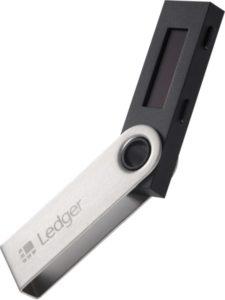
Ledger Nano S is one the most preferred hardware wallets in the cryptocurrency community. As a matter of fact, if you asked any crypto user about the best wallet, it’s not surprising for the Ledger Nano S wallet to pop up in their top three list of preferred wallets. And if you think I’m pulling your leg and are not convinced at the end of this review, check out what other Ledger Nano S reviews say about this piece of tech.
The Ledger company has in the recent past earned a top spot as one of the best producers of crypto wallets. Having launched its best pioneer product in 2016 (Ledger Nano S), the wallet offers users a cold storage facility for their digital assets to minimize the risk of being hacked.
In addition, the wallet is compatible with hundreds of digital assets ranging from the most famous ones to the least known. And if you need affordability and the security of your coins, this is might be a great choice for you.
However, despite its affordability, which is its biggest claim to fame, the wallet boasts a number of superior features, including data backup and recovery, two-factor authentication, password protection, and more.
Ledger Nano S in a Nutshell
Product Name: Ledger Nano S
Wallet Type: Hardware
Affordability: Affordable
Supported Cryptocurrencies: BTC, BCH, BTG, ETH, ETC, LTC, DOGE, ZEC, XRP, DASH, STRAT, KMD, ARK, EXP, UBQ, VTC, VIA, NEO, XST, XLM, HSR, DGB, QTUM, PIVX, POSW, EOS, TRX, PPC, BTCP, ZEN, XZC, MIOTA, POA, RSK, kUSD, VET, ICX, PART, ONT, WAN, and more.
To give you a heads up of how this wallet works, we’ve linked to a video below from the Ledger Nano S team:
From the video, you can see that Ledger Nano S has an OLED screen, which pretty much resembles those of other top wallets such as Trezor and KeepPay.
The sleek screen allows users to double-check their transactions prior to authorizing them. If you’ve used its predecessor, Nano and Ledger HW.1, then you’d realize how big of a deal this LED screen is.
Also, you’ll be pleased to note that the wallet connects to any computer running on any operating system, including Mac OS, Windows, and Linux.
With every purchase comes the Ledger Nano S wallet, 1 USB cable, a key, a ring, a lanyard for wearing the device around your neck, and a recovery sheet for noting down the seed. (A seed is a secret word that you randomly choose to help you recover your device in case you ever lose it.)
How to Make a Deposit to the Wallet
Did you know that technically hardware wallets don’t store your coins in the device itself? Rather what happens is that the wallet tracks the coins on the blockchain, which is a virtual ledger that records all crypto transactions.
Now what remains stored in the wallet is your private key; this is what actually grants you access to your coins.
But, of course, you won’t notice all this happening; once you plug and install Ledger Nano S in your computer, the processes take place seamlessly.
How to Make or Receive Payments
Before you are be able to make or receive any payments, you’ll need to set up the wallet. The process has been made quite easy to enable you to get started in no time.
Below are steps to follow to configure the wallet:
- Plug your wallet into a computer using the provided USB cable
- Create a secret PIN.
- Establish your data recovery process.
- Install the Ledger Nano S application or extension depending on the device you’re using.
- You can now start transacting with your wallet.
Is Ledger Nano S Safe?
This is one of the main reasons why we decided to post this Ledger Nano S review; we believe a wallet is the ultimate tool for securing your assets, and if it does anything less than that, then we’ll tell it like it is.
So, is this wallet secure?
Cold Storage: As a hardware wallet, the device offers offline storage for digital assets. Most exchanges recommend offline storage to protect users’ assets from hackers or system errors.
Additional Passphrase Feature: This key security feature lets you add custom text to your 24-word recovery phrase. It improves the wallet’s security level. However, the Ledger Nano S team discourages using it unless you are certain your existing phrase can be hacked.
Security PIN: Beyond the passphrase, the wallet allows users to set up a PIN code. This is one of the first security steps after receiving the wallet. The PIN is a four-digit code needed to send payments. Also, after three incorrect PIN attempts, the wallet wipes the existing PIN. You will then have to set up the PIN again from scratch.
So, what do you think? Is it safe enough? We’ll let you ponder that for now. But essentially, Ledger Nano S has proven over time to have some of the best security controls among wallets. The offline storage, automatic backup and restoration, PIN protection, and more ensure your coins are secure.
Pros and Cons
Pros
- Seamlessly integrates with multiple wallet applications
- The Ledger Nano S is one of the most affordable hardware wallets
- Contains an OLED screen for viewing and verifying your transactions
- Compatible with almost all cryptocurrencies
Cons
- None that we know of
Conclusion
Thanks for reading this Ledger Nano S hardware wallet review to the very end.
At the moment, I believe that this is one of the widest used hardware wallets and, as you’ve seen, the numbers don’t lie. Clearly, the security levels that come with this wallet are simply top-level; and if you had doubts about its price due to its popularity, check out their website for the latest price and a detailed breakdown of its features.